


Refer a Patient
Community health-care providers can refer patients to SickKids outpatient clinics through EpicCare Link, a secure online portal accessed through the electronic Child Health Network (eCHN). An eCHN account is required to refer a patient via EpicCare Link.
EpicCare Link streamlines referrals, informs you when your referral is received, redirected, or booked for an appointment. It will also provide quick access to patient health information, lab results, doctor’s notes, and more.
Care for patients under 18 years old is guided by institutional policies, with flexibility to consider exceptions when clinically appropriate.
How to register for EpicCare Link
To access EpicCare Link, you must first register for an eCHN account.
Registration options:
- Online through the eCHN Sign Up page
- Call the eCHN Service Desk at 416-813-7998
- Email service.desk@echn.ca
After you submit the application form, your account will be set up within 24 hours.
How to submit a referral
- Review the clinic referral criteria before making a referral.
Please note that not all clinics have referral criteria. Browse the Clinics Directory for a full list of clinics and if the condition you are looking for is not listed, please proceed to make your referral. - Log in to EpicCare Link to refer a patient to SickKids.
For urgent/same-day referrals:
Contact a clinic directly via SickKids Locating at 416-813-1500. On weekends and after 6 p.m. on weekdays, please reach out to the “Fellow on call” via SickKids Locating.
Need support?
Support is available during business hours, Monday to Friday, 9 a.m. to 5 p.m.
Phone: 416-813-8289
Email: ec.link@sickkids.ca
For international patient referrals
Contact the International Patient Program
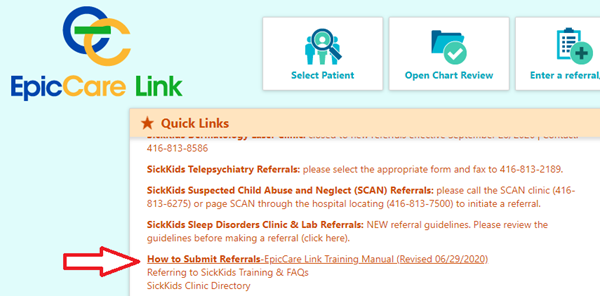
EpicCare Manual: How to submit referrals
A step-by-step manual is available to guide you directly in the Quick Links section on the EpicCare landing page.